
AI Menu Analyst
Bigger checks from every kiosk. Without anyone managing the menu.
Every night, for every store, AI Menu Analyst reads the store’s own sales and sets up tomorrow’s kiosk: what to show first, what to suggest, and when. Checks get bigger, lines move faster, and nobody on your team touches a screen.
Same POS · Smarter kiosk · Bigger checks
The problem
Your kiosk menu was set up once. Your guests order from it every day.
A kiosk is the one member of staff who never suggests anything. It shows the same list to everyone, in the order someone typed it into the POS, and leaves the rest to the guest’s finger.
Somebody set it up once.
The kiosk menu was arranged at install, by whoever had an afternoon. They have since moved on. The kiosk still shows it that way, item by item, in POS order.
Every store gets the same screen.
What sells at the airport terminal is not what sells at the stadium, and breakfast is not dinner. One list for every store, every hour, treats them all the same.
Guests scroll past what they would have bought.
Two hundred items, one finger. The side they wanted was below the fold, so the check came out smaller than it should have. Every order, every day.
Fixing it by hand means someone, every week, in every store, in a CMS. Nobody has that someone.
Every night · Every store · No days off
An analyst inside every kiosk, working through the night to grow your check.
While the store sleeps, the analyst reads the day’s sales and writes one Kiosk Plan for tomorrow. The kiosk follows it from the first guest.
Watcheswhere guests tap, what they skip
what sells at what hour, what goes together
- Watches
- Curates
- Suggests
- Checks
Watches: where guests tap, what they skip
- 01
Watches
What guests tap and what they scroll past. What sells at which hour, and what goes together, in this store’s own orders.
- 02
Curates
Builds tomorrow’s Kiosk Plan: the Discover Screen, the order of items and categories, and what to suggest. Your POS menu and prices never change.
- 03
Suggests
One add-on at the right moment: after an item is added, in the cart, at Pay Now. One card each time, never a wall of offers.
- 04
Checks
Every pick against kiosks running without it, in your own numbers. Keeps what works, drops what did not.
It understands your menu, not just your numbers.
Finding patterns in sales tells you what sold with what. AI Menu Analyst goes further: it pairs statistical and machine-learning models with the latest generation of generative AI, which reads your menu the way a person would. It knows a butternut squash soup is a seasonal vegetarian starter that belongs with cool weather and a dinner trade, and it can say why it deserves a place in Worth a Try. Every pick comes with its reason, in plain words, before it reaches a kiosk.
Kiosk Plan · Worth a Try · two of this week’s picks
- Nashville Hot Chicken Sandwich — Your launch item this week, and guests are not finding it yet.
- Butternut Squash Soup — A seasonal starter that suits the cool weather, and the row has no soup.
What your guests see
The kiosk your guests get, from the first tap to Pay Now.
Same menu, same prices, same POS. What changes is what the guest sees first, and the one thing the kiosk suggests at each moment. Footage from the XPR demo store.
The first screen
What sells here, first.
One tap and the guest lands on the Discover Screen, built from this store’s own sales: Specials you want pushed, Quick Add drinks and sides that go into the basket in one tap, Worth a Try picks with a written reason, Popular Right Now by the hour, Most Ordered, and Great Together with one button that adds both.
After an item is added
Pairs well with this.
The guest adds a main. One card suggests the item that most often rides along with it, in this store’s own baskets. Add it or skip it, one tap either way, and the order moves on.
In the cart
A meal without a drink? A drink.
One strip above the order. Food without a drink gets a drink, and on a hot day a cold one. A main without a side gets a side. The guest can ignore it and carry on.
At Pay Now
One last nudge.
A dessert, because this order has a meal and no dessert. One card, then the guest pays. Never a wall of offers.
The menu itself
Same menu, same prices. Only the order.
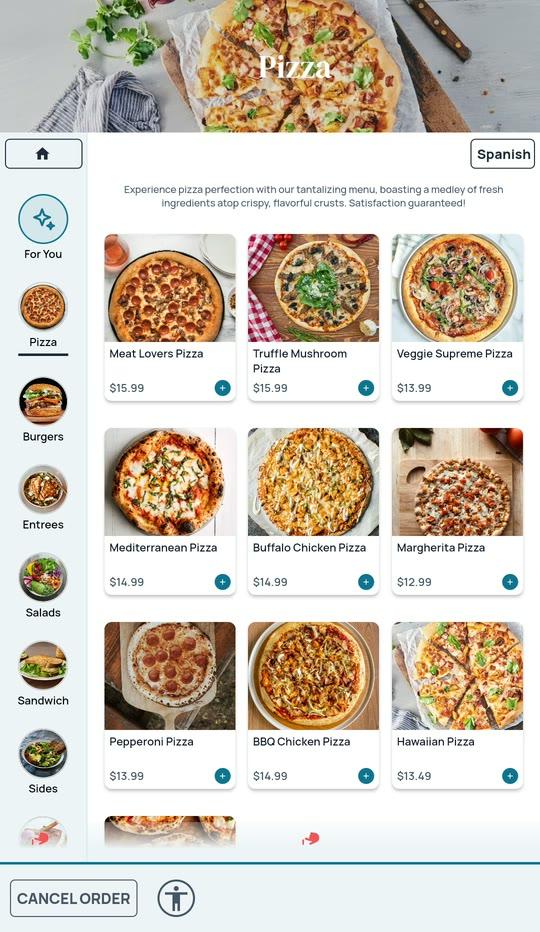
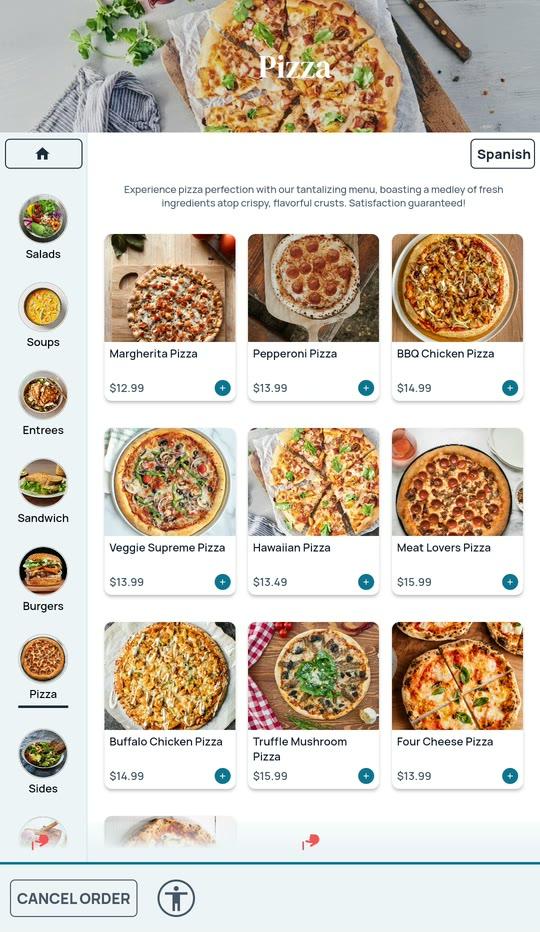
Open a category on a kiosk with the analyst and the items this store actually sells sit at the top, with last week counting double. The categories move too, meals before add-ons. On the Comparison kiosk, the same category in POS order. Your POS menu never changes. Only what the kiosk shows first.
Never a wall of offers
If you are thinking “this will flood my guests with pop-ups,” this part is for you.
The point is a bigger check and a faster line. Not a longer one. Every suggestion runs inside these rules.
A budget per order
You set how many suggestions a guest may see in one order. The kiosk stops asking after that.
One card per moment
Never a stack. One suggestion, then the order moves on.
Declined stays declined
An item the guest turns down is not offered again in that order.
Nothing changes mid-order
Tomorrow’s plan arrives overnight. A guest never sees the menu shift under their hand.
Your rules win
Any upsell rule you set up yourself shows first. The analyst’s own suggestion stays out of the way.
What you control
One page per store. Your rules always win.
The analyst knows the numbers. You know what is going on this week. One page in the XPR CMS is where the two meet, and it takes a minute, not an afternoon.
A switch per store
Roll it out one store at a time. Turn it off and the kiosk is back to POS order the next morning.
Boosts
A good deal on beef? Push every beef item for two weeks, at the strength you choose. By ingredient, item or category, with dates, and a preview of exactly which items it reaches.
Never Push
Keeps an item out of Specials, Worth a Try and every suggestion, whatever the numbers say.
A note to the analyst
“Fall launch week: introduce the new sandwich.” It reads the note when it picks Worth a Try. Guests never see it.
The Kiosk Plan, in words
Before anything reaches a kiosk you can read it: the picks and why each was chosen, every suggestion as a plain sentence, what moved on the menu.
Enable AI Menu Analyst
One store at a time. Off, and the kiosk is back to POS order tomorrow.
What this store runs
Experiment: some kiosks with the analyst, some Comparison kiosks without. They swap on a schedule.
Boosts
+ Add boostStrength
From
Until
Preview the items this reaches →
Never Push
A note to the analyst
How it is measured
Measured in your own stores. Not in our claims.
Some of a store’s kiosks run with the analyst. The others, the Comparison kiosks, run without it, and they swap on a schedule so no kiosk’s spot by the door skews the result.
Your Intelligence Suite shows both groups side by side: order value, items per order, how often suggestions are accepted. Each metric with its lift, a confidence range, and a plain decision. From the first week, in your numbers, so you never have to take our word for it.
Intelligence Suite · AI Menu Analyst against Comparison
IllustrativeShapes, not figures. The card in your Intelligence Suite carries the real numbers for your stores, with the confidence range on every lift.
Questions operators ask
The straight answers.
If yours is not here, ask us. A thirty-minute call with your own menu on the kiosk answers most of them.
Contact SalesDoes it change my POS menu or prices?
No. The analyst changes only what the kiosk shows first and what it suggests. Items, prices, modifiers and the order that reaches your POS stay exactly as they are.
Will it bury my guests in pop-ups and slow the line?
No. You set a budget of suggestions per order, there is one card per moment, an item a guest declines is not offered again in that order, and nothing changes in the middle of an order. The point is a bigger check and a faster line, not a longer one.
What if there is something I do not want pushed?
Never Push keeps an item out of everything. Boosts push what you choose for the dates you choose. And any upsell rule you have set up yourself always wins over the analyst’s own suggestion.
How do I know it is working?
You run it on some of a store’s kiosks and not on others, the Comparison kiosks, and they swap on a schedule. Your Intelligence Suite shows order value, items per order and how often suggestions are accepted for both groups, with the lift, a confidence range and a plain decision. The numbers are your own stores’, from the first week.
What does my team have to do?
Switch it on for a store. Add a boost or a note when you have something to push. Read the Kiosk Plan if you want to. Nothing daily, nothing weekly.
What kind of AI is behind it?
A combination, so you get the best of each. Statistical and machine-learning models find the patterns in your own sales: what sells, at which hour, with what. The latest generation of generative AI models then reads the menu itself, the way a person would: it understands what each item is, tags and groups it, weighs your note for the week, and writes the reason for every pick. Pattern-finding alone does not know that a soup is a starter or that a latte is seasonal. The analyst does.
Which POS does it work with?
It runs on the XPR Kiosk, which integrates with Oracle Simphony, PAR Brink, Genius POS by Heartland, NCR Aloha, Revel and more. Same POS, smarter kiosk.
Start with one store
Switch it on for one store. Watch your own numbers grow.
Book a thirty-minute demo and we will run the analyst over a menu like yours: the Discover Screen, the three moments, the controls, and the results card. Same POS. Smarter kiosk. Bigger checks.
Already on XPR Kiosks? Ask your account manager to switch it on.